When you’re near the ceiling and want to catch intersample clips before printing.
-
Check for intersample clipping during digital-to-analog conversion.
-
Detailed usage density display for each bit.
-
Reveal effective signal bit depth independent of file or engine settings.
-
Display current audio sample rate.
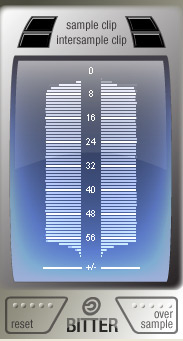
Bitter shows how many of the available bits are being used by the audio signal, reports clipping samples, and estimates when digital-to-analog conversion would cause intersample clips.
Typical bitscope use cases include verifying render dither behavior, checking whether processing reduces signal bit depth, and testing source data quality.
When you hover over the display, Bitter also reports stream sample rate.
Each bit’s usage for each stereo channel is shown as a horizontal line. Shorter lines indicate less use, missing lines indicate unused bits, and full-width lines can reveal stuck-bit errors.
By oversampling the signal, Bitter can estimate intersample peaks that may exceed full code during conversion and warn you before those issues reach playback.
Download Evaluation Copy
macOS: macOS 11.0 Big Sur or later. Universal 2 installer for Intel and Apple Silicon Macs.
Windows: Windows 10 version 1709 or later, or Windows 11. Requires a 64-bit Intel/AMD system, or a supported Windows on ARM system with x64/ARM64EC compatibility.
Free plugin. Just download and enjoy.